Shelf health
Find shelves that are really one shelf, review and apply proposals, and keep a shelf as it is.
Shelves drift. Two shelves end up holding the same books, or one shelf turns out to be several topics. Library Hub finds the first kind by itself, from names and shared books. Checking each shelf by what its books are about, and proposing trims and splits, needs Topic Map: Install Topic Map to check shelves by what their books are about. Either way, nothing changes until you apply something, and everything can be undone.
Check shelves#
Run Shelves: Check shelves, select Check… under Check shelves in Settings → Library Hub → Shelves, or Check shelves in the Library panel's Shelf tab. A window says what the check does. Select Check. No model is asked, and it costs nothing.
It looks at every pair of shelves for two tests:
- Names alike: their names are over 0.85 alike, letter by letter, case, accents and punctuation aside ("Tibetan Buddhism" and "Tibetan Buddhism 2").
- Books in common: over three quarters of the books on either shelf are on both.
A pair that passes either test waits in the Library panel under Needs you, in its own row, pairs of near-duplicate shelves. Select the row, then the pair's Review. Review says which test it passed and lets you choose the shelf to keep:
- Merge pins the other shelf's books to the one you keep and deletes the other, as one run you can undo.
- Delete deletes the other shelf and moves none of its books. You can undo it.
- Keep both stops asking about the pair until either shelf's books change.
Shelves alike only in subject ("Coyote tales" and "Trickster stories") pass neither test; Topic Map finds those.
Proposals#
A check by what the books are about (Topic Map's) makes proposals: a trim takes off-topic books off a shelf, a split makes new shelves for the parts that are real topics. They wait under Needs you in the shelf proposals row. Select the row, then a proposal's Review. Review is a dry run. It lists the books that would leave the shelf, each new shelf with its name, its books and its score, the books that stay and why, and the score now and after.
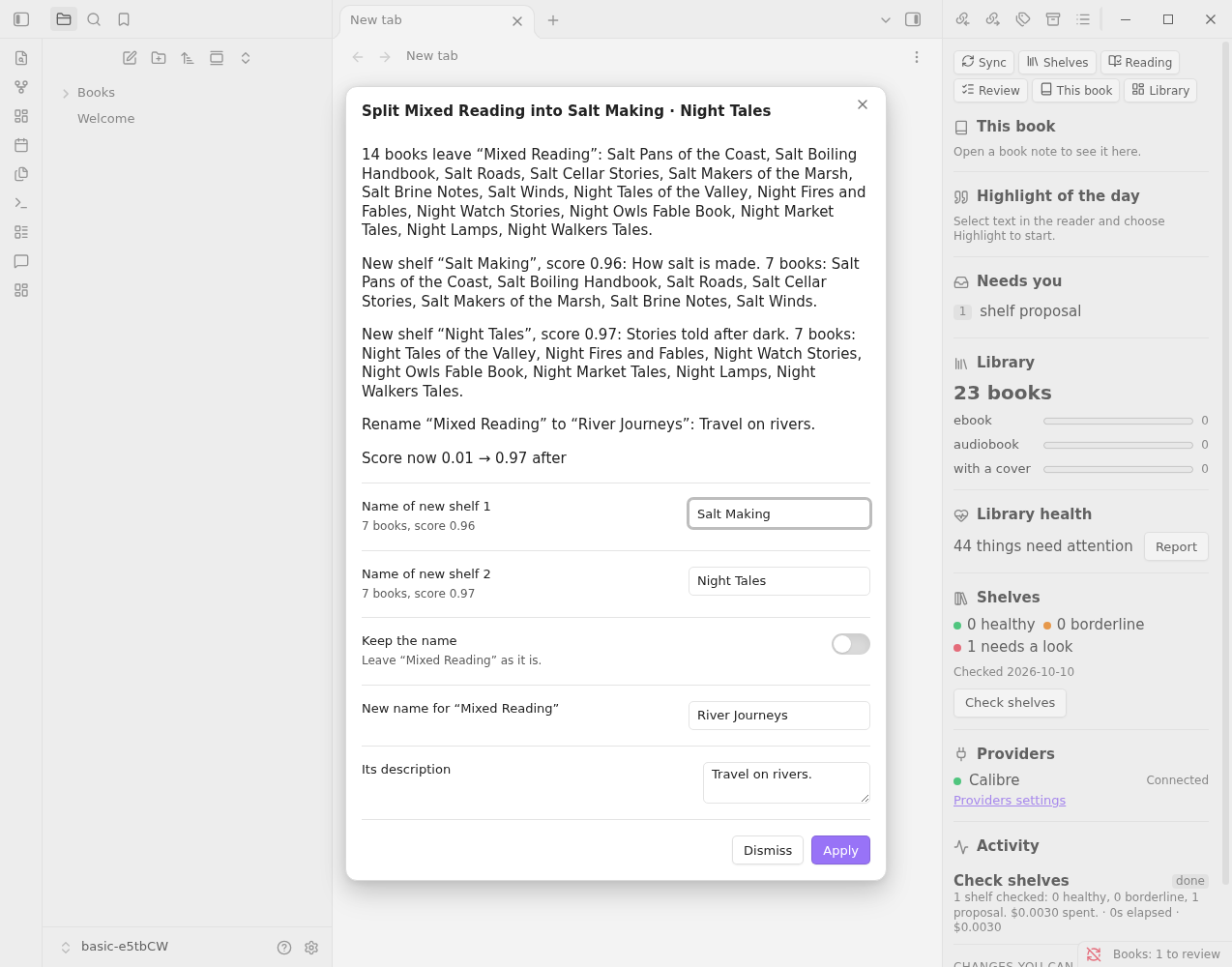
You can edit the names of the new shelves, and the new name and description for the shelf that stays. Turn on Keep the name to leave the old one.
- Apply writes everything as one run: the books are taken off (as
shelves_exclude), the new shelf notes are made and filled, and the original shelf's score and description are updated, ashealthandcheckedin its note. - Dismiss drops the proposal. It is not made again until the shelf's books change.
A book a proposal names as off-topic but keeps (it is on no other shelf) stays. A book you took off a shelf (the × in the Shelf view) is never put back. A proposal for a shelf whose books have changed since is dropped at the next check.
Undo#
The notice after Apply, Merge or Delete has an Undo link. You can also run Sync: Undo a notes sync and pick the run. Undo restores every changed note and moves the new shelf notes to the trash.
Keep as is#
Some shelves are meant to be broad: a series, or an umbrella you filled by hand. Run Shelves: Keep as is on a shelf note (a button on the panel's Shelf tab, or right-click the note) to leave it out of the checks. It sets keep: true in the note; run it again to turn it off.