Providers
Where your books come from: Calibre, Audiobookshelf, OPDS catalogs, Hardcover, Readwise, Audible, and what each one adds to a book note.
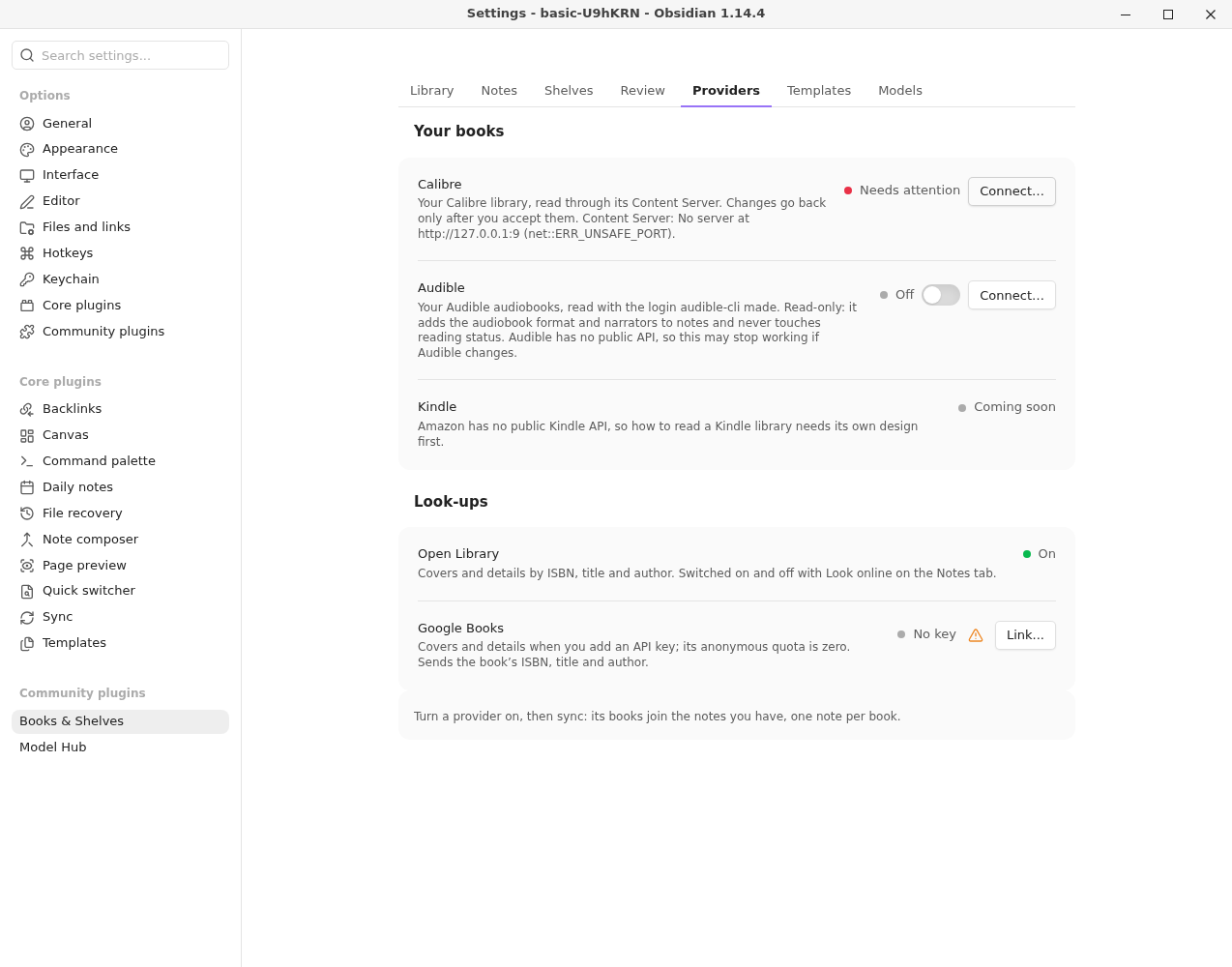
A provider is a place your books live: Calibre, an OPDS catalog, Audiobookshelf, Hardcover, Readwise and, only in builds with Audible, Audible (see below). Each one is switched on in Settings → Library Hub → Providers, with its state on the right, and a warning when it needs you.
Opening a book#
Each provider can say how a book it holds is opened: Calibre offers its files (read in the reader), Audible offers the book's Audible page. See Reading in Obsidian.
One note per book, whatever it comes from#
If you own Dune in Calibre as an ebook and on Audible as an audiobook, you get one note. The sync matches them by a stored id, then ISBN, then title and author, and puts both formats on that note: formats: [ebook, audiobook]. A book that exists only on Audible gets a note of its own. When two notes could be the same book, nothing is written for it, and the sync preview lists it under Unclear.
Each provider's own ids go on the note under its name, such as calibre_id and audible_asin, so the next sync finds the same note again.
Calibre#
Always on. See Connect to Calibre. Calibre is the only provider that changes anything outside Obsidian, and only through the review queue.
Audible#
Only in builds with Audible. Released copies of Library Hub leave Audible out. It's there only when you build the plugin yourself with Audible switched on:
npm run build:audible, orLIBRARY_HUB_AUDIBLE=1 npm run install-to -- /path/to/vault. In a copy without it, a vault that had Audible on shows one line on the Providers page, Not in this build, and your notes keep what Audible already gave them.
Reads your Audible library and adds to your notes:
- the audiobook format;
- narrators and runtime (in minutes), which the default template writes;
- the series, publisher, language and release date, kept as
audible_series,audible_publisherand so on unless a template uses them.
It is read-only. It never writes your reading status or listening progress.
Connect it#
- In a terminal, once:
audible quickstart(audible-cli). Choose the external login and follow the steps. - In Providers, open Audible, turn it On, select Connect…, then Import login… and choose the file audible-cli made, usually
~/.audible/audible.json. - Select Test. It says Signed in.
- Select Sync… on the Library panel's Library tab. Audible's books are in the same preview.
Library Hub keeps only three things from that file: the device's signing key, its token and its marketplace, in Obsidian's keychain. It sends requests to Audible's servers to read your library, signed as audible-cli signs them. It does not use your password or any other part of the file.
Audible has no public API. This works the way the community tools do, so Audible may stop allowing it, and Audible's terms may not allow it. If it stops working, the other providers and your notes carry on, and the sync tells you Audible could not be read.
Looking things up#
Open Library and Google Books are used for covers and to look up details, as before. They are listed here so everything that sends a book's details out is in one place. They are set up on the Notes page.
Other providers#
There is no Kindle provider: Amazon has no public Kindle API. Readwise brings Kindle highlights in.
-
Audiobookshelf: audiobooks and ebooks from your own server, with listening progress (Audiobookshelf).
-
Sharing is not a provider but its counterpart: it publishes your shelves outward (Sharing shelves).
-
Readwise: your highlights from Kindle and other readers, in your books' highlights notes (Readwise).
-
Hardcover: status, rating and dates for your books, and a want-to-read list as notes (Hardcover).
-
OPDS catalogs: books and files from Komga, Kavita, Calibre-Web or any OPDS server (OPDS catalogs).
What a provider can bring#
A provider can list books, say how to open one, bring reading activity (status, rating, dates, progress) and supply highlights. Calibre and Audible list books; Calibre also supplies files.