Tools and approvals
What a tool is, who decides whether it runs, and where every call is recorded.
A tool is one thing a plugin can do when asked: list your shelves, add a book to one. A plugin registers its tools with Model Hub the way it registers roles. Anything that can ask for a tool, such as another plugin or an agent outside Obsidian (see Use Model Hub from Claude Code, Claude Desktop or Codex), goes through Model Hub, so one set of rules and one record covers all of it.
Each tool is either a read (it only looks) or a write (it changes something). Every tool is named namespace.name, such as books.list_shelves.
Decide what runs#
Open Settings → Model Hub → Tools. Each plugin that has registered tools has a row with its name, how many tools it has, how many you've set on their own, and its setting for all of them. Select the row to see its tools underneath, and again to hide them.
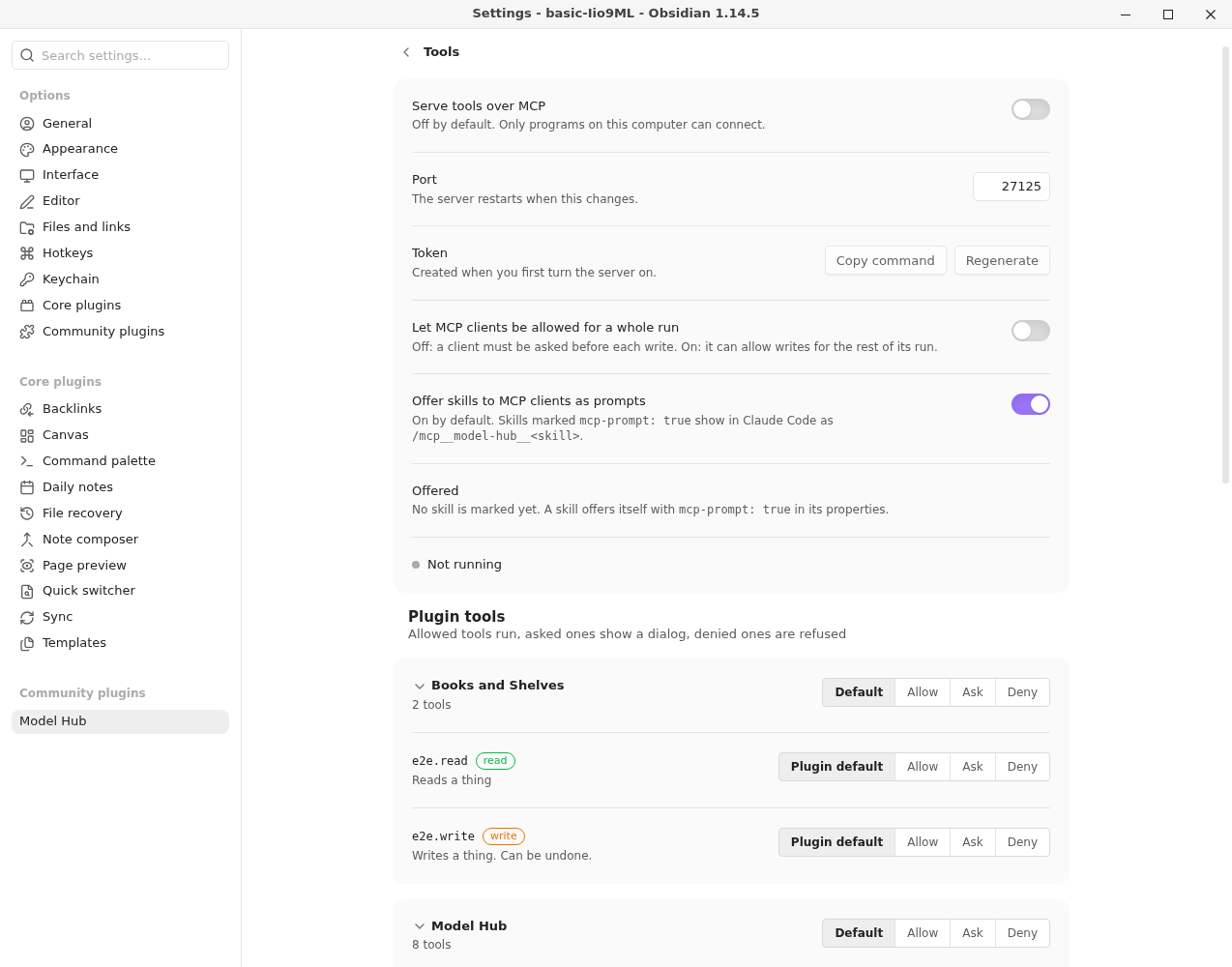
Each plugin and each tool has one of these settings:
| Setting | What happens |
|---|---|
| Allow | The tool runs without asking. |
| Ask | A dialog asks you each time. |
| Deny | The tool is refused. |
| Default | On a tool, Plugin default: use the plugin's setting. On a plugin, use the built-in rule. |
The first setting that applies wins: the tool's, then its plugin's, then the built-in rule. The built-in rule is that reads are allowed and writes ask. A plugin you have not touched can look at things but changes nothing until you say so.
Approve a call#
When a tool is set to Ask, a dialog opens. It names who is asking (a plugin, Model Hub's panel, or an outside client such as Claude Code, over MCP), the tool, whether it reads or writes, the exact arguments, and what the run has spent so far. Nothing runs until you answer.
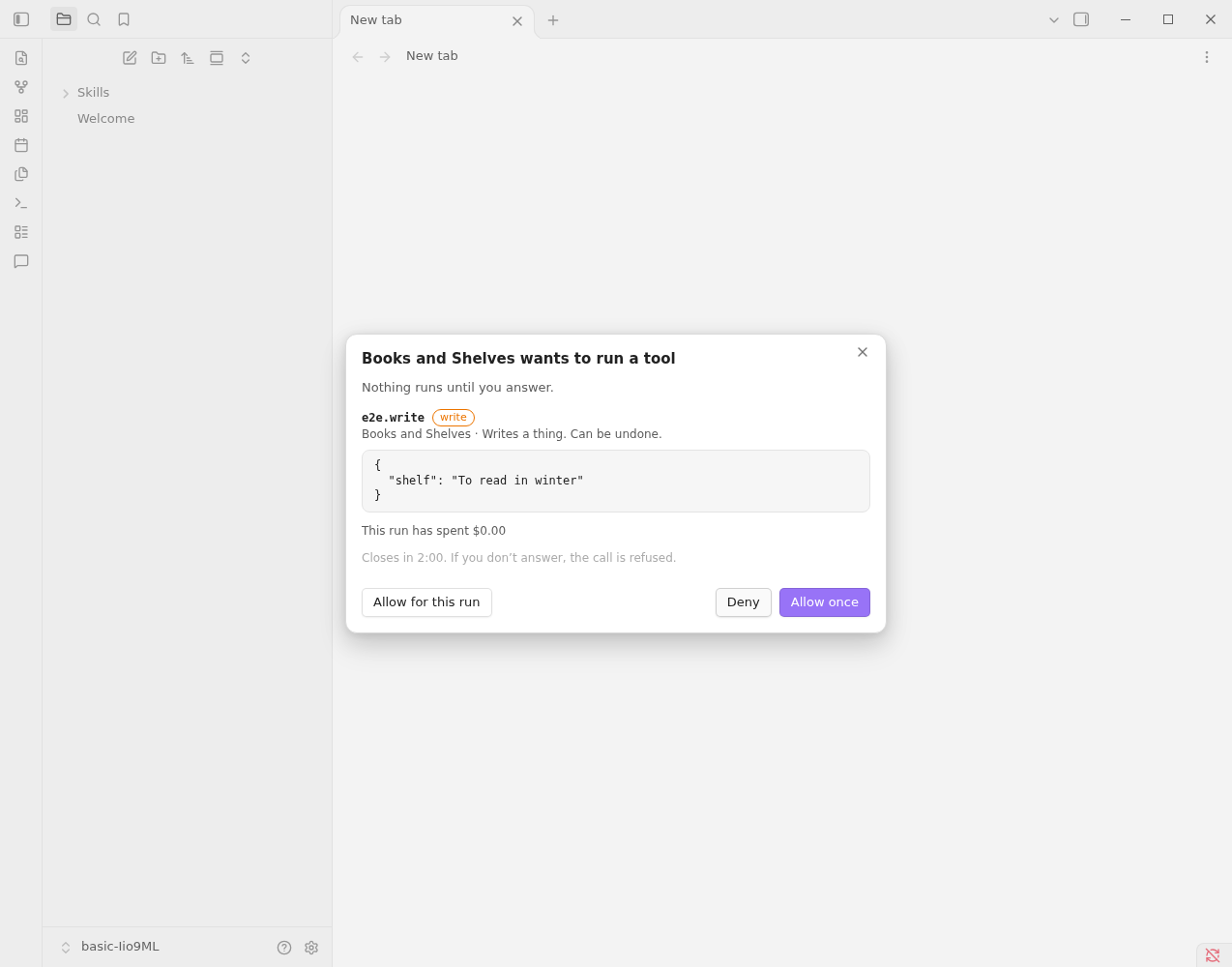
| Button | What happens |
|---|---|
| Deny | The call is refused. |
| Allow once | This call runs. The next one asks again. |
| Allow for this run | This call runs, and so does this tool for the rest of the run, without asking. |
Some details:
- A run is one piece of work by one client: a conversation with Claude Code, or one job a plugin starts. Allow for this run ends when the run does.
- Dialogs come one at a time. Each waits 2 minutes for your answer; if you don't answer, or close the dialog, the call is refused.
- Outside clients over MCP get no Allow for this run on writes, so each write asks. To change that, turn on Let MCP clients be allowed for a whole run on the Tools page. Reads are not affected.
- If you set a tool to Deny while its dialog is open, the call is refused even if you then allow it.
- A tool can say in its own words what it will do. A tool that edits notes shows the edits instead of the arguments: each note, the text that goes struck through, the text that comes marked, and a warning for risky changes such as a changed number. The arguments are still there under Raw arguments.
Undo a write#
When a write succeeds and its plugin can put the change back, a notice appears: the plugin and the tool, "done", and an Undo button. The notice stays for 15 seconds. Select Undo and the plugin reverses the change and tells you what it put back. Each undo works once, and it is recorded in the log.
A write whose plugin offers no undo shows no button. Check what a tool does before you allow it for a whole run.
Limits on every call#
- The arguments are checked against the tool's schema before anything runs. A wrong call is refused with a message saying what is wrong.
- A tool that takes longer than 60 seconds is stopped.
- A result over 100 000 characters is cut (25 000 in the chat panel), and the cut is marked so the caller knows.
- A run can have a spending limit for the model calls made inside it. A call that would go over it is refused.
The tool-call log#
Every call is one line in tool-calls.jsonl in Model Hub's plugin folder, next to the ledger (usually .obsidian/plugins/model-hub/). Calls that were refused or failed are there too, with the error code and message, and so are undos. A write's undo handle is kept on its row. Plugin authors are told to keep note text out of error messages.
A line holds the time, the run, who asked, the plugin and tool, whether it read or wrote, how it ended and how long it took. The arguments are not stored. They can hold note text, so the log keeps only a SHA-256 hash of them: enough to tell whether two calls had the same arguments, not enough to read them. Uninstalling the plugin deletes the log.
To read it, open the usage view (Model Hub: Models: Show usage and costs). Tool calls (this month) shows each tool's calls, refusals and failures, then the last 20 calls. The Run menu at the top narrows both the model calls and the tool calls to one run. See See what you spent.
If you send traces to an OpenTelemetry collector, tool calls and undos go out as spans too, with the arguments as a hash only. What a trace holds is under Settings.
When a call is refused#
A refused or failed call reaches the caller as an error with a code and a plain message.
| Code | What it means |
|---|---|
tool-unknown | No plugin has registered a tool with that name. |
tool-invalid-input | The arguments don't match the tool's schema. |
tool-denied | The setting is Deny, the run may not use that tool, you declined, or nobody answered in 2 minutes. |
tool-failed | The tool ran and failed, or its plugin was unloaded during the call. |
tool-timeout | The tool ran over 60 seconds. |
aborted | The caller stopped the call, or the run ended. |
run-budget | The run's spending limit would be passed. |